Disputed Payments
Last updated: September 15, 2026
This is a guide that will teach you:
What is a dispute/chargeback?
Types of disputes
Different dispute scenarios in Ascend
The dispute process
Withdrawing disputes
Refunds on programs with disputed payments
What is a Dispute?
A dispute (also known as a chargeback) occurs when an insured reports a payment made through Ascend as fraudulent or unauthorized to their bank or credit card company. The bank or card company then opens a formal dispute, which immediately freezes the payment and starts the dispute resolution process.
Please note that the entire lifecycle of the dispute resolution process, from initiation to the final decision from the bank, can take as long as 2-3 months to complete. Ascend cannot speed this up, as the customer's card company or bank dictates the timeline.
Common Reasons for Disputes include:
The payor wants to cancel the policy
The payor's payment method was lost or stolen
The payor accidentally disputed the charge
The payor is waiting for a refund
How might a dispute affect the customer?
A dispute filed on an Ascend payment may result in one or more of the following:
Cancelation of coverage, due to a break in loan payments
A delay or pause in issuing refunds
Stages of a dispute
You can track exactly where a dispute stands from the program's dispute banner in Ascend — click View dispute at any point for full details. A dispute typically moves through four stages:
1. Your customer disputed a payment The dispute has just been filed and the clock has started. The banner will show:
The reason the customer gave (e.g., "The customer claims that they did not authorize the payment")
The deadline for your team to counter the dispute (e.g., "You have until Aug 1, 2026 to counter this dispute")
The amount your agency is liable for while the dispute is open (e.g., "Your agency is liable for the amount of $2,315.00")
What's actually happening behind the scenes: as soon as the dispute is filed, the cardholder's bank immediately freezes the disputed funds — Ascend never has access to that money while the dispute is active.
At the same time, Ascend's system automatically generates a settlement invoice billing your agency for the full disputed amount. This happens right away and regardless of the eventual outcome — it's how Ascend keeps the loan/policy current while the case is pending, so it is not a sign that you've lost the dispute.
If you counter the dispute and win, the invoice is resolved and the funds are returned to you; if you lose, the invoice stands and your agency remains liable for that amount plus the $15 dispute fee.
2. Dispute in review Your team has submitted a response (or the customer hasn't yet), and the dispute is now with the cardholder's issuing bank. The banner will show:
A note that the dispute is under review by the issuing bank
An estimated timeline — results can take up to 3 months
The amount your agency remains liable for until a decision is reached (e.g., "Your agency is liable for the amount of $1,865.00")
As with stage 1, winning the dispute returns this amount to you.
3. Response under review Once your team submits evidence to counter the dispute, the banner updates to reflect that your response — not just the original dispute — is now what's being reviewed. It will show:
The date your response was submitted (e.g., "Your response submitted on Jul 22, 2026 is under review by the cardholder's issuing bank")
A reminder that results can take up to 3 months
4. Dispute lost If the bank rules in the customer's favor, the dispute is marked lost. At this point:
Your agency is liable for the disputed amount plus the $15 dispute fee
You should create a settlement invoice to send to your customer for the disputed amount, so the loan can be brought current (or the balance recovered, for non-financed programs)
Throughout stages 1–3, the disputed funds stay frozen and Ascend cannot process refunds on that program.
Dispute scenarios
1. Paid-in-full, one-time payments, and installment plans (no financing)
Step 1 — Notification. When an insured files a dispute, Ascend immediately notifies both the cardholder and the producer of record.
Step 2 — Contact the insured. Your team should reach out right away to confirm why the dispute was filed.
Step 3 — Resolve based on intent:
If the dispute was... | What to do |
|---|---|
Accidental | Ask the insured to withdraw the dispute with their card company (withdrawal steps below). If the bank has already closed the account and issued a new card, the dispute can't be withdrawn — email support@useascend.com and our team will create a "catch-up" invoice for the insured to pay. Once paid, Ascend accepts the dispute as resolved. |
Intentional | Submit evidence of the insured's approval for the transaction (emails, texts, signed documents) either in Ascend or to support@useascend.com. The insured's bank will review the evidence and render a decision. |
Outcomes for intentional disputes:
Result | Impact |
|---|---|
Won by your company | Payment is released to Ascend; no penalty. If your client paid a "catch-up invoice," the duplicate will be refunded to them. |
Lost (won by insured) | Your company is liable for the disputed amount plus a $15 dispute fee. |
2. Financed programs — dispute on a down payment
(Includes down payments with catch-up monthly installments.)
If the policy was never bound, cancel the program in Ascend immediately.
Your agency is financially responsible for disputed down payments.
Resolve based on intent:
If the dispute was... | What to do |
|---|---|
Accidental | Ask the insured to withdraw the dispute (see below). If the account/card was closed and the dispute can't be withdrawn, email support@useascend.com to set up a catch-up invoice. Once paid, Ascend accepts the dispute. |
Intentional | Submit evidence of approval (emails, texts, signed documents) in Ascend or to support@useascend.com. The bank will review and decide. |
Outcomes:
Result | Impact |
|---|---|
Won by your company | Payment is released to Ascend; no penalty. |
Lost (won by insured) | Your company is liable for the disputed amount plus a $15 dispute fee. |
3. Financed programs — dispute on a monthly installment
The disputed installment is treated as an overdue payment as of the day the dispute is reported, and a NOIC/NOC is issued on the standard timeline (typically 15–20 days).
Ascend generates a Settlement Invoice, visible in the program's Transactions table, labeled "Dispute."
Share this invoice with the insured to prevent cancelation of the finance agreement while the dispute is under review. Once it's paid, the loan is considered current.
Once the settlement invoice is paid and the dispute is resolved:
Result | Impact |
|---|---|
Won by your company | The disputed funds are applied as a credit to the insured's loan balance. |
Lost (won by insured) | No further impact — the loan and policy were already canceled. This will have an effect on any refund they might receive from the program canceling (this will be explained in more detail below) |
If the insured refuses to either withdraw the dispute or pay the settlement invoice, the finance agreement and policy are canceled. If your insured refuses to either withdraw the dispute or pay the settlement invoice, their finance agreement and policy(s) will be canceled.
Collect Disputed Funds From Your Customer
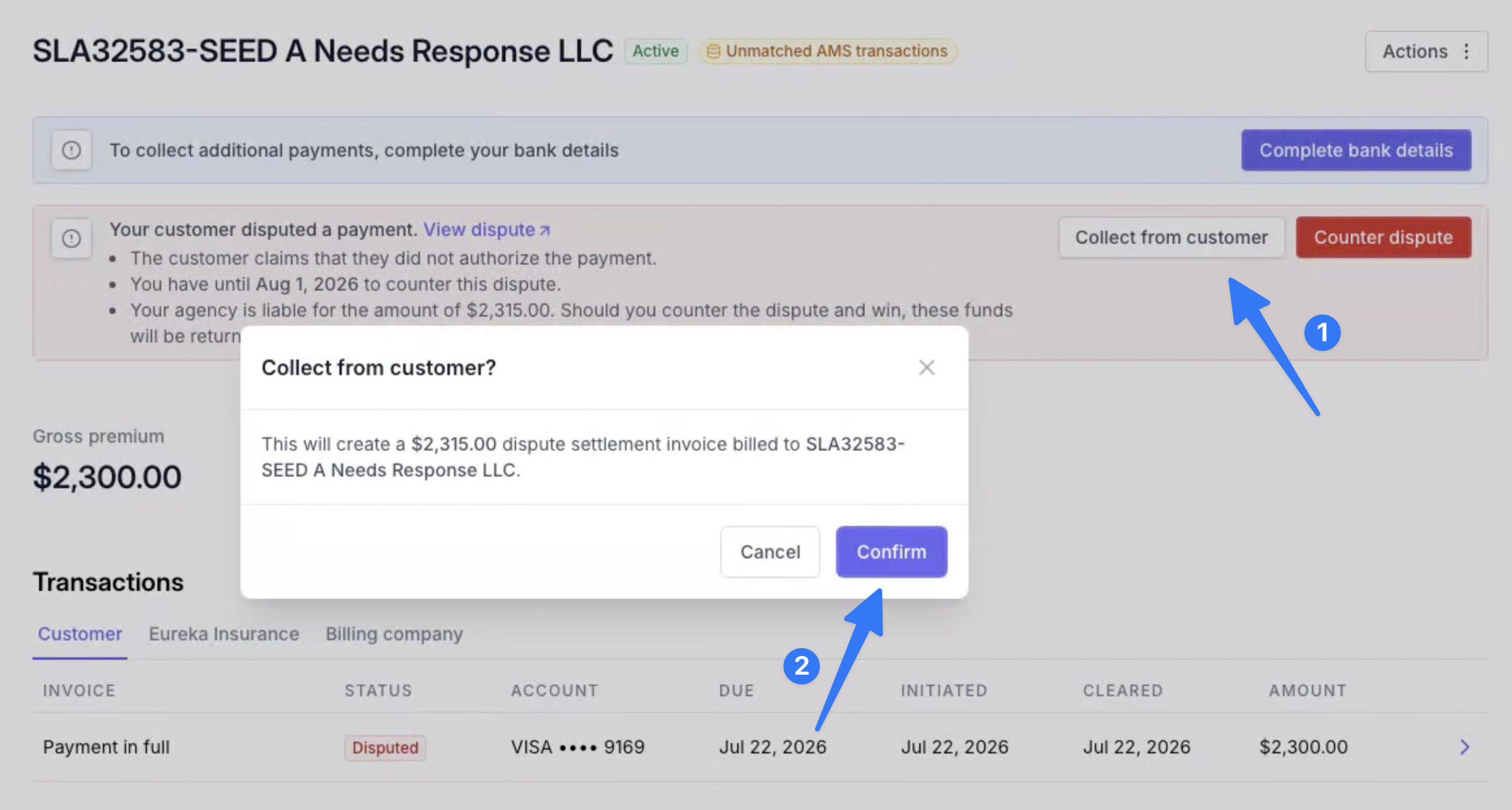
For a disputed checkout or one-time payment, you can bill a settlement invoice directly to the customer from the dispute banner.
To create the settlement invoice:
From the program page, click Collect from customer in the dispute banner.
Click Confirm in the popup.
The invoice appears in Transactions, labeled "Dispute."
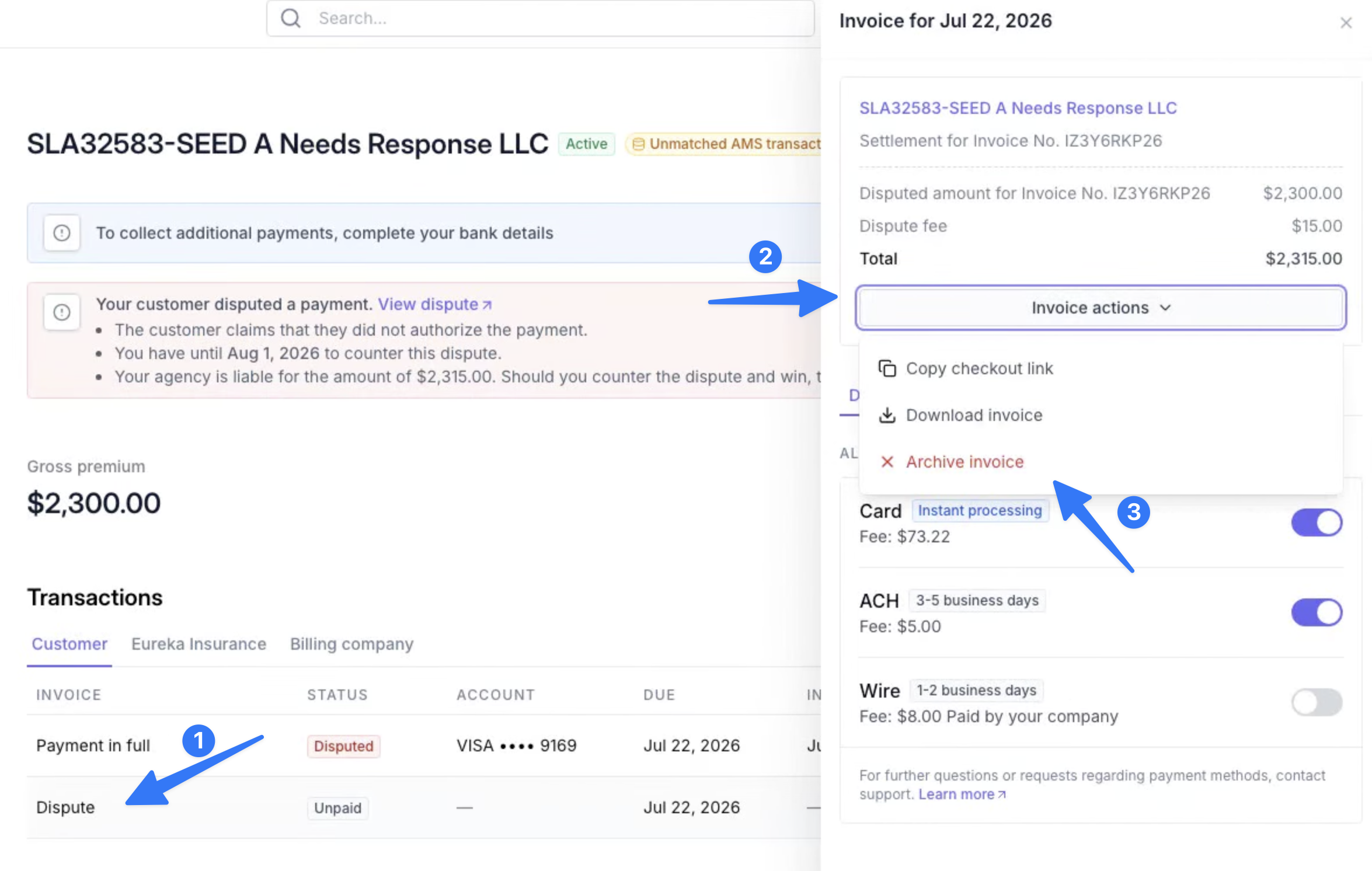
To archive the settlement invoice:
Click the "Dispute" transaction.
Select Invoice actions from the popup.
Choose Archive Invoice.
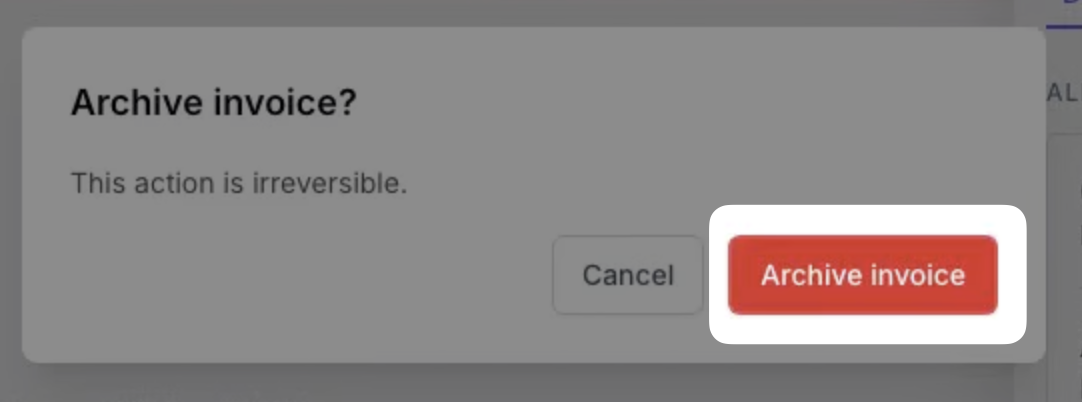
Confirm by clicking Archive Invoice.
Disputes on Canceled Policies
If an insured files a dispute on an already-canceled policy, here's how to help move things along:
Confirm the program is canceled in the Ascend dashboard.
Talk to your customer. Make sure they understand:
Premium finance loans stay active until the return premium (RP) is received from the carrier/MGA and the loan is closed out — even after the policy itself is canceled. Most refunds go out within 30–60 days of the cancelation date, and the loan remains active until then.
Withdrawing the dispute speeds up the refund, since it skips the bank's investigation period.
Contact the wholesaler/MGA/carrier for the RP issuance date and amount, and let them know the insured's loan stays open until the RP is sent.
Ascend cannot process any refunds on a program with an active dispute.
Withdrawing Disputes
Get proof of withdrawal. The cardholder shares proof that they withdrew the dispute (forwarded email, screenshot from their card issuer, etc.). Once withdrawn, the bank re-bills the account for the original charge and — depending on the bank — may issue a formal letter of withdrawal, or just an electronic notification/online statement update. Send us either the letter of withdrawal or the re-billing statement:
It should be a screenshot of the insured's online banking portal, or an image of a paper statement.
We need to see the cardholder's name, the card's last four digits, and the date and amount of the dispute. Other sensitive info can be redacted.
A letter of withdrawal must explicitly state the dispute was dropped/withdrawn.
A re-billing statement should show the date of the original charge, the date of the conditional credit, and the date the credit was reversed.
Collect payment for the disputed amount. While a dispute is under review, the funds are frozen and can't be applied to the policy. If the insured wants to withdraw the dispute to avoid loan/policy cancelation, they'll need to make an additional payment for the disputed amount — since the review can still take months even after withdrawal. If the dispute is ultimately decided in the insured's favor, that extra payment is refunded.
Intentional Disputes
If the insured confirms they intend to dispute the charge, send us any supporting communication (screenshots, emails, text threads) to support@useascend.com as evidence to counter the dispute. If the dispute is lost, your team may be responsible for the disputed amount, the $15 dispute fee, and the transaction fee.
If the dispute was filed because the policy is canceled and the insured wants a refund, confirm the program is canceled in Ascend's dashboard and make sure the insured understands the difference between canceling the policy and canceling the loan used to finance it — see Disputes on Canceled Policies above.
Arbitration
Ascend doesn’t support the arbitration phase for disputes, which means that you can’t escalate disputes to arbitrators through our platform.
FAQ
How does Ascend determine cancelation effective dates?
Cancelation dates come directly from the carrier — Ascend doesn't set them. For example, if the carrier cancels a policy effective 2/1, the refund is calculated from that date once Ascend receives the corresponding return premium. Ascend applies the RP to the loan balance first, then refunds any remaining amount to the customer.
Insured refunds are sent by check to the address on file.
Agency-owed amounts (e.g., unearned commission) are either deducted from the agency's next payout or requested via a payment link.
How long does it take to refund for a cancelation?
Ascend can only process refunds on financed programs once the return premium is received from the carrier/MGA and the loan is closed out. Refunds on financed programs directly depend on the carrier sending the return premium. Most refunds will be issued within the 30-90 day timeframe from the date of cancelation. However, the refund timeline will be extended if the carrier still needs to send the return premium to us within that timeframe.
If your customer has filed a dispute while waiting for a refund on a canceled policy, we will work with them to retract the dispute and contact the carrier directly to speed up the refund process as much as possible. Ascend will not process any refunds on a program with an active dispute.
Please note that the full lifecycle of a dispute, from initiation to the final decision from the bank, can take as long as 2-3 months to complete.
Contact Us
Need more help? Contact us at support@useascend.com for more help.